
 Free limited




Can I customize CTA & Newsletter in Figma?
Yes. The EmviUI file is editable: adapt colors, typography, spacing, and variants to your product’s visual system.
Screens
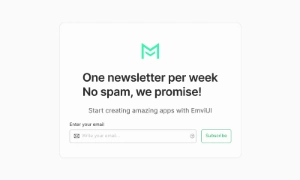
Use this editable Figma template for a newsletter signup section. Organize benefit, email field, consent details and confirmation state around a clear primary action and adapt the layout to your product.
 Not included in free version
 Premium
175 Variants
 Premium
181 Variants
 Premium
32 Variants
 Free
Free
264 Variants
 Free
Free
88 Variants
 Premium
176 Variants
 Free
Free
32 Variants
 Premium
144 Variants
 Free
Free
12 Variants
 Premium
12 Variants
 Premium
8 Variants
 Premium
65 Variants
 Premium
86 Variants
 Premium
32 Variants
This newsletter signup section helps users understand the value of subscribing and sign up by email. Order information around the user's next task, then make the primary action easy to find. Keep supporting details secondary so the screen remains easy to scan.
Use the screen to organize benefit, email field, consent details and confirmation state. Keep labels, status messages and actions next to the content they describe, and make key information easy to scan. On small screens, keep the primary action and essential details visible first.
Including a brief message about what subscribers can expect from the newsletter helps build a connection and
set expectations. Mentioning the frequency of emails and the type of content—such as new product
announcements, industry news, blog posts, and exclusive discounts—assures users of the value they will
receive. This transparency fosters trust and encourages ongoing engagement.
Our UI kit includes customizable Newsletter Sign-Up section components that can be easily integrated into
any page, ensuring a seamless and effective way to grow your subscriber list and keep your audience informed
and engaged.
Yes. The EmviUI file is editable: adapt colors, typography, spacing, and variants to your product’s visual system.
The collection brings together multiple CTA & Newsletter patterns that you can adapt to digital product flows. Open the Figma preview to explore the included designs.