Best Practice: Configurable vs Separate Components for Complex Forms
Choose component boundaries by their interaction contract. Share stable cells and field groups, and separate APIs when tasks, semantics or state ownership change.

Choose component boundaries by their interaction contract. Share stable cells and field groups, and separate APIs when tasks, semantics or state ownership change.
Use one configurable component when its options preserve the same interaction, semantics and state ownership. Create separate public components when the user task or behavioral contract changes, and share the smaller controls underneath. A compact table and a comfortable table can often share an API; a report table and a spreadsheet editor usually need different contracts. The goal is a boundary that readers of the code can predict.
This guide gives a best practice for deciding between one highly configurable component and separate components for responsive tables, complex forms and many variants. The decision framework and fictional examples are design recommendations, supported by the linked platform documentation. They are not a universal component taxonomy or measured productivity claim.
Choose the boundary by behavior
Start with a sentence describing the component’s promise. For a customer list: “Compare customers, follow a profile link, and optionally select records for an action.” For an editable allocation grid: “Navigate cells, modify values and commit or cancel edits.” Similar rows and borders do not make those promises interchangeable.
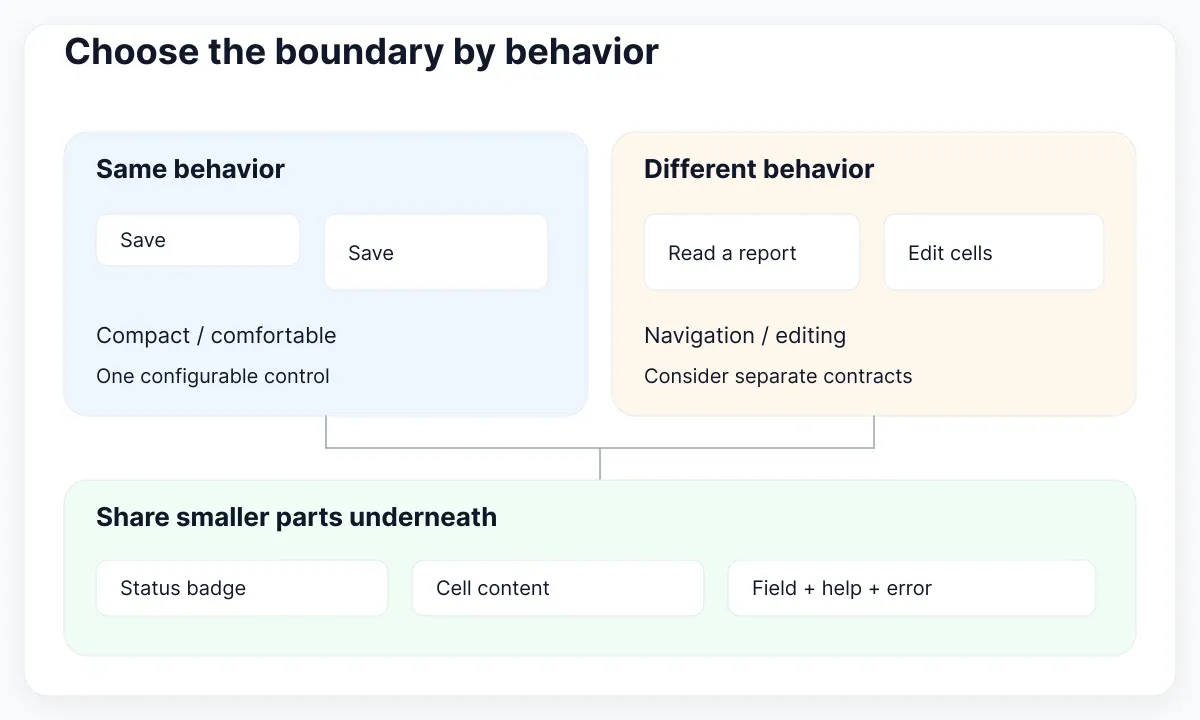
Write down what stays invariant: accessible role, keyboard behavior, data shape, ownership of changes and recovery after failure. Then classify proposed options. Density, a visible caption and a cell renderer may customize one promise. A switch that replaces link navigation with an editing workflow can change the promise itself. That is a reason to consider separate entry points, even when their visual parts remain shared.
For example, prefer a named CustomerTable and AllocationGrid over an EverythingTable whose editable, selectable, spreadsheet and mobile booleans silently redefine interaction. This is a recommended public API choice, not a demand for duplicated internals. Both entry points can reuse formatters, status badges, empty-state copy and surface styles.
Keep the decision local to the consumer. If one screen needs a download button above the table, compose that button outside the table before adding exportPermissions, exportEndpoint and exportFormat to every instance. For the broader distinction between shared controls and application compositions, use the component library architecture guide.
Separate supported options from impossible states
Count meaningful combinations rather than props alone. Three independent booleans describe eight theoretical configurations, but your product may support only four. Record which combinations are valid and what the consumer should do when a requested combination is unsupported. A large API becomes especially difficult when callers must memorize invisible exclusions.
Suppose an invoice form exposes isSaving, hasError and isComplete. Saving while complete might be meaningless in that workflow. Replace the overlapping status flags with a named status such as editing, submitting, failed or saved, while keeping genuinely independent data separate. React’s state-structure guidance recommends avoiding contradictory and redundant state; it does not impose a numeric prop limit.
Use a short capability table in the component documentation: supported mode, required inputs, available actions, owner of state and verification example. A selection mode could require selectedIds and onSelectionChange. A display mode should not require callbacks that are never used. When the language supports it, model mutually exclusive modes explicitly rather than accepting an unstructured bag of optional fields.
Do not split automatically at the fifth prop or the tenth variant. A date field can legitimately need several independent options. Conversely, two props can hide incompatible behaviors. Ask a teammate to configure the two most different supported consumers without reading internal conditionals. If the teammate cannot predict which inputs matter, improve the contract before adding another flag.
Keep table and grid contracts explicit
A table with links or buttons does not automatically become an ARIA grid. The deciding factor is the intended interaction model. Treat semantic and keyboard changes as first-class architecture decisions, with explicit examples and acceptance checks.
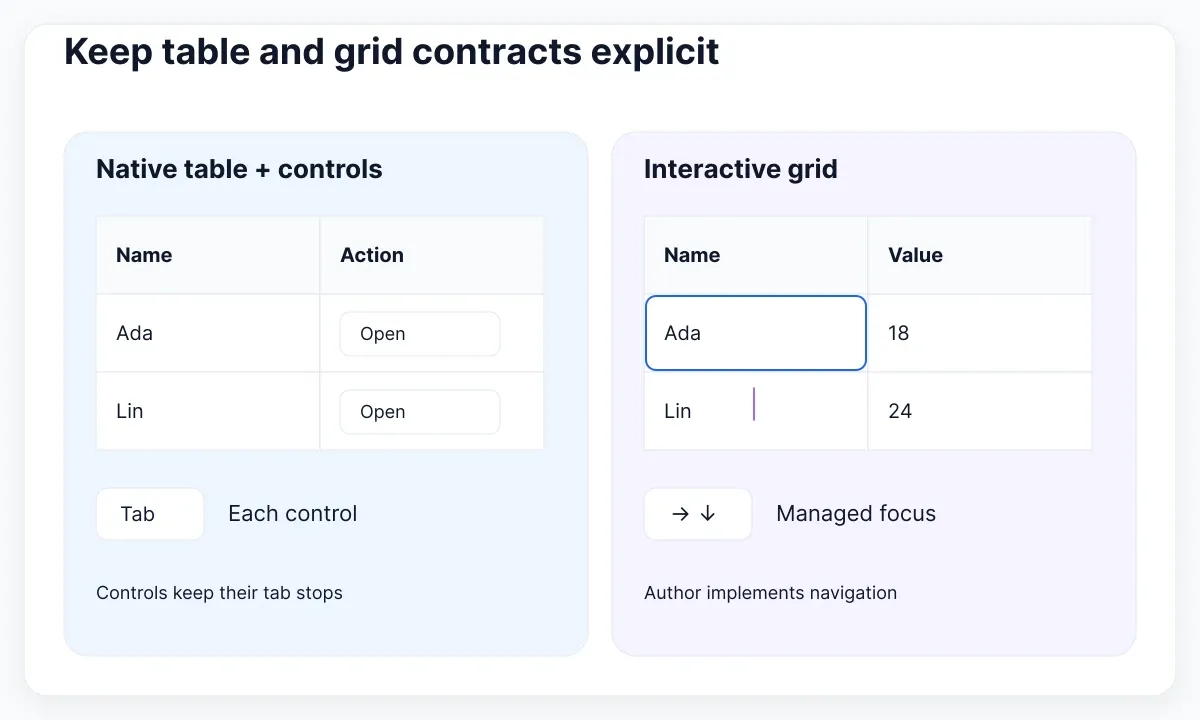
The WAI table pattern describes a tabular structure whose contained controls retain their own tab stops, and recommends native HTML tables where possible. The WAI grid pattern describes a composite widget with managed focus and directional navigation. Adding a role alone does not implement that navigation. A native table can contain interactive controls without adopting grid behavior.
For a read-oriented customer table, specify the caption, column headers, sort announcement and row actions. For a budget editor, separately specify entering a cell, editing its value, leaving edit mode and reporting a failed save. Then decide which low-level renderers can be shared. Keep selection rules and focus movement attached to the contract that actually uses them.
In review, run the same small dataset through both contracts: a long customer name, a missing optional value and one unavailable action. Observe whether the intended user can reach and understand each action. Keep the results with the component examples. Follow the responsive table design walkthrough for the narrower decision about presenting columns on small screens.
Inspect reusable cells with EmviUI
Use a real visual specimen to identify reusable parts before generalizing an entire screen. The EmviUI cell collection shows text, avatars, badges, progress and row actions. Those are useful candidates for independent cell content rather than one giant table variant.
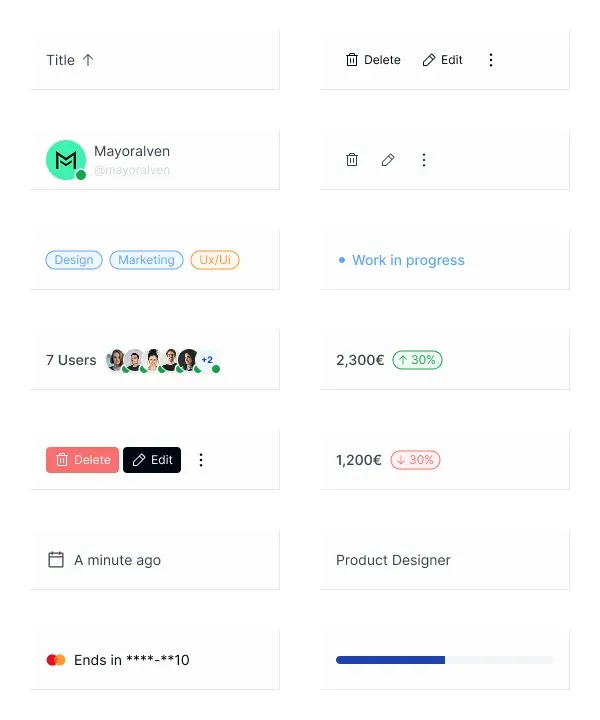
The live EmviUI component catalogue provides a visual starting point for this exercise. In the pictured collection, compare the labeled Edit and Delete controls with the icon-only action group. Record the names your implementation must expose, the behavior behind each action and who authorizes it. The image demonstrates appearance; it cannot establish keyboard support, backend permissions or production behavior.
Build one fictional customer-list composition using a customer cell, a status cell and an action cell. Reuse the same status cell inside a detail panel without importing the customer table. If that requires table-only context, decide whether the context is necessary or whether the cell has absorbed responsibilities that belong to the parent. EmviUI helps you explore the visual composition; your application still needs data contracts and behavioral verification.
Avoid inferring prices from example amounts visible in a specimen. Treat all sample values as illustration content. The useful question here is whether each part communicates its role and can survive another context. Keep the original specimen next to the proposed API so designers and developers can discuss the same concrete elements.
Compose complex forms around real tasks
For complex forms, share stable field groups while allowing each task to own its submission workflow. A create-customer form and an edit-customer form may share contact fields but differ in defaults, permissions, cancellation and successful completion. A single form with isCreate, isEdit and isWizard switches can obscure those differences.
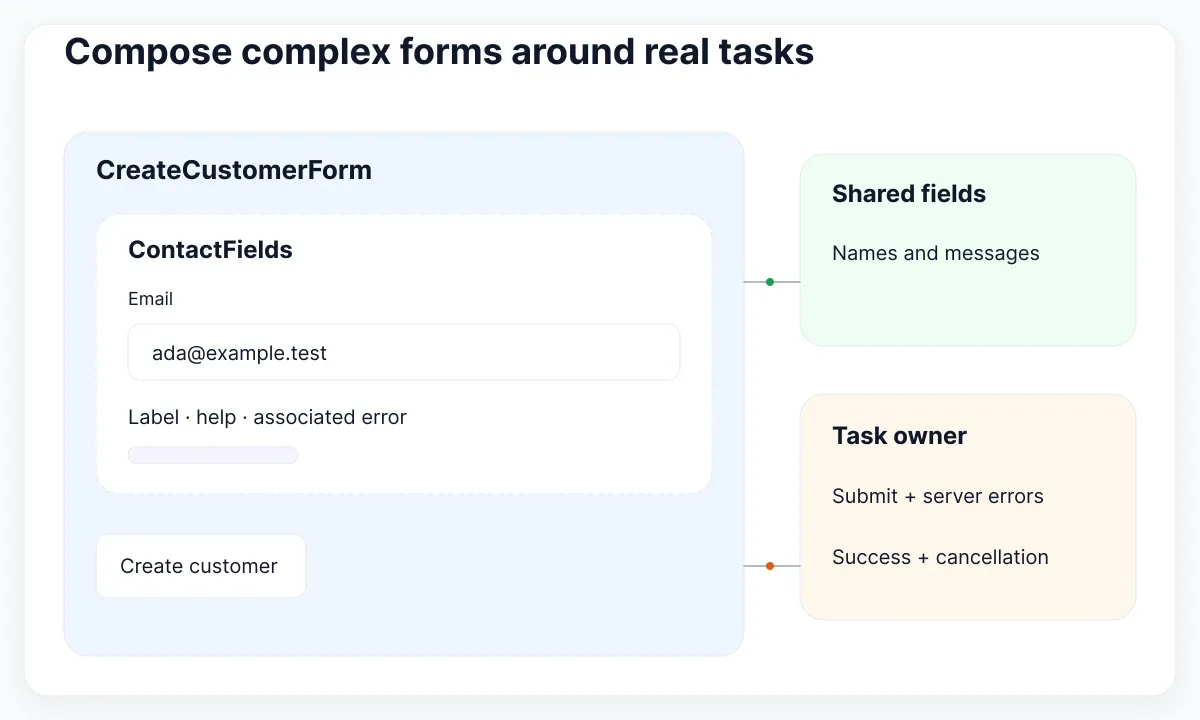
Composition gives you another option: render ContactFields inside task-specific forms, and accept actions or supporting content as explicit children or named regions. React documents passing JSX through children so a wrapper can contain content without knowing its implementation. Use that flexibility where it keeps a meaningful boundary; arbitrary nesting is not automatically a good API.
Preserve semantic grouping while composing. WAI’s grouping tutorial explains fieldset and legend for related controls. Its validation tutorial also distinguishes client feedback from server-side validation. In the proposed design, a field group can render labels, help and associated messages, while the task form interprets the server response and decides what happens next.
For a concrete failure case, let the server reject a customer identifier while accepting the email format. Keep the entered email, expose the identifier problem beside its control, and give the caller a defined way to map the response. Do not make a shared text field understand customer-account business rules. Document whether changing a field clears its previous error, and verify that behavior with the product team.
Give shared state a clear owner
State ownership is part of the API. If a table and a details panel must agree on the selected customer, choose one owner for the selected identifier. Let both consumers receive the current value and request changes through an explicit event. Separate local presentation state from shared product state.
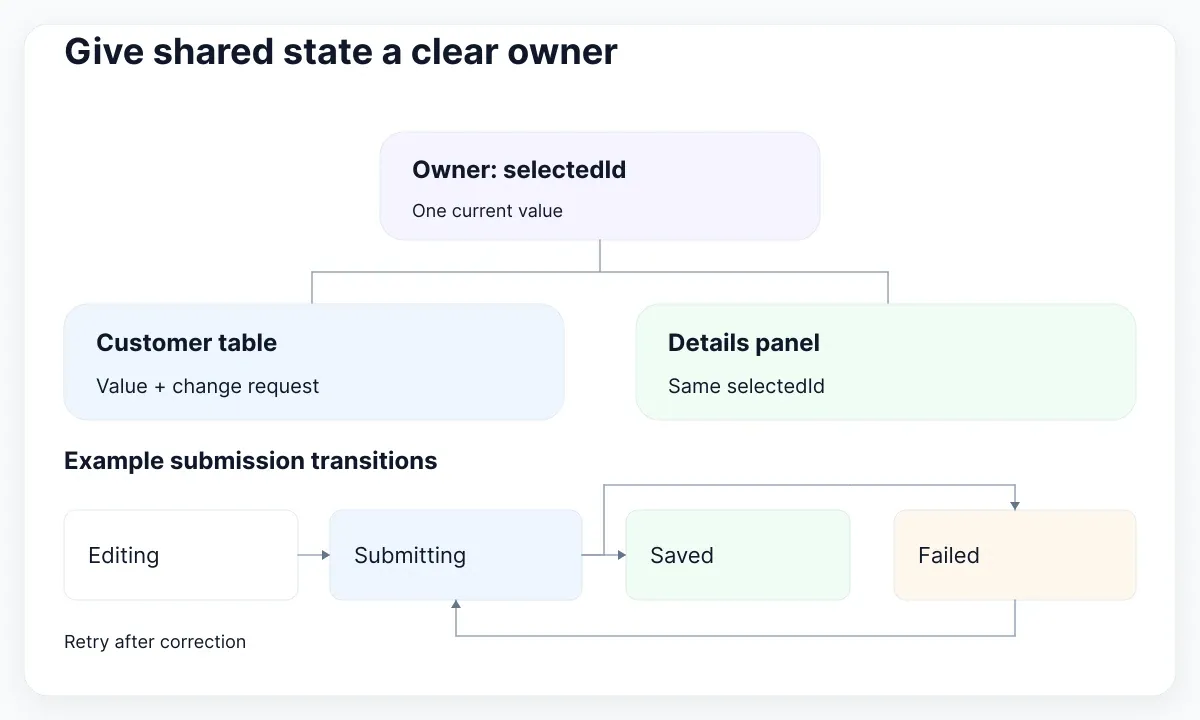
React’s guidance on sharing state describes moving coordinated state to a common parent. Apply that principle deliberately: a field’s temporary focus state may stay local, while the active customer belongs above both views. Document what happens when the selected customer disappears from the current results and whether filtering preserves selection.
For a submission workflow, draw the allowed transitions: editing to submitting; submitting to saved or failed; failed back to submitting after correction. This is an illustrative model, not a complete specification for every form. Add cancellation or partial success only when the task needs them. Keep server errors and entered values alongside the status, with clear ownership.
A designer should be able to map each state to a specimen, and a developer should know which event enters it. For planning visual alternatives in Figma, the guide to variants and UI states is a useful next step. A Figma variant documents a representation; it does not implement runtime transitions or persistence.
Change responsive layout without losing work
Responsive changes can expose a bad component boundary. Turning a wide report into a narrow list may alter layout alone, or it may remove essential comparison and editing tasks. Decide which case you have before creating mobile and desktop APIs that drift apart.
WAI’s Reflow explanation discusses content at a width equivalent to 320 CSS pixels and exceptions for content that requires two-dimensional layout. A data table exception is not permission for unrelated page controls to overflow. In your own acceptance criteria, identify which region needs horizontal movement and which surrounding controls must adapt.
In the fictional customer form, type a value and trigger an error, then change viewport width. The pending values should follow the product’s stated preservation rule. React’s preservation and reset documentation explains that state depends on component identity and tree position; replacing a subtree or changing its key can reset local state. A breakpoint should not accidentally discard work.
Prefer one owner for the draft and two presentations only when two presentations are needed. Retain stable field identifiers and verify how focus behaves if a focused control moves or disappears. For a table-to-card presentation, explicitly retain labels and required actions rather than assuming a visual rearrangement communicates the same relationships. Test the actual implementation, since a static canvas cannot prove these properties.
Migrate one consumer before expanding
Migrate the smallest consumer that exercises the disputed behavior. Keep its data, permission cases and expected actions fixed while changing the component boundary. This makes it possible to compare the old and proposed contracts without mixing in a new product workflow.
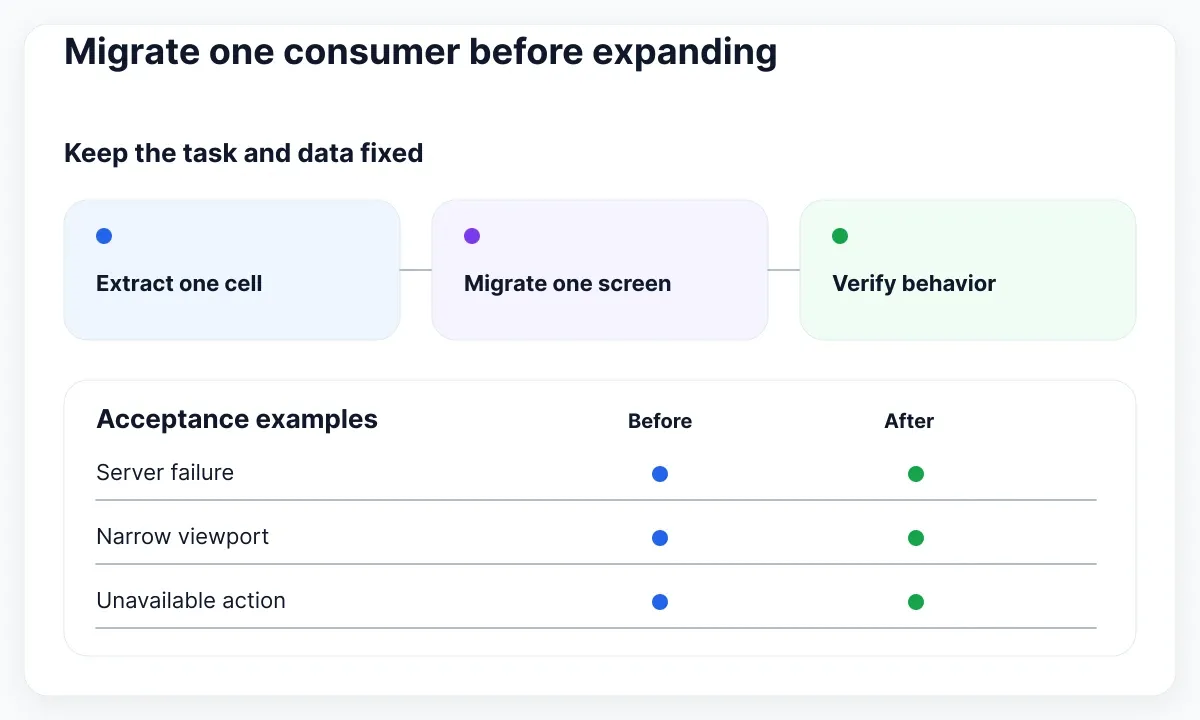
For example, extract CustomerActions from the existing customer table, expose selectedIds through one documented owner, and move the customer-creation request into CreateCustomerForm. Keep the same visible labels during that pass. Then review whether a second consumer can reuse the extracted parts without importing unrelated behavior. If it cannot, revisit the abstraction while the change is still small.
- Write the invariant behavior and the supported configurations.
- Separate semantic or keyboard contracts that differ.
- Compose shared fields, cells and actions around task-specific owners.
- Verify failure, empty data, permissions and narrow layouts.
- Record a migration example and remove the obsolete path deliberately.
The useful evidence is a working consumer, a small set of representative examples and an explicit state contract. If both public components need the same fix to a shared badge, update that badge once. If their save behavior diverges, keep those workflows separately understandable. Reuse should make changes easier to reason about; the number of exported component names is not the success metric.

Pablo Mayoral
Senior UX/UI & Web Designer with 10+ years of experience. Creator of EmviUI (10k+ components Figma design system), UImand, and Vitamin Bootstrap. Currently designing digital products at CQMRewards.