Dashboard UI Kit React Teams Can Trust: Filters and Data
Apply a React dashboard kit to one analytical question: connect applied filters, metric scope and accepted results, then test refresh failures and narrow layouts.

Apply a React dashboard kit to one analytical question: connect applied filters, metric scope and accepted results, then test refresh failures and narrow layouts.
A dashboard UI kit React teams can trust must keep the displayed metrics tied to the filters that produced them. Start with one analytical question, make the applied scope visible, and design loading, empty, stale and failed states before connecting the full dashboard. Test rapid filter changes as carefully as the finished chart. This guide uses a fictional support analytics screen; its numbers and acceptance rules are proposed examples, not measured product results.
Define the metric and its scope
Begin with a question a reader can answer: “How many support requests did the Europe team resolve this week?” Our example needs a team, a reporting interval, a definition of resolved and an update time. Write those beside the metric specification before choosing chart colors. A card labeled “Resolved” with a large number leaves too much interpretation to the reader, even when the typography looks convincing.
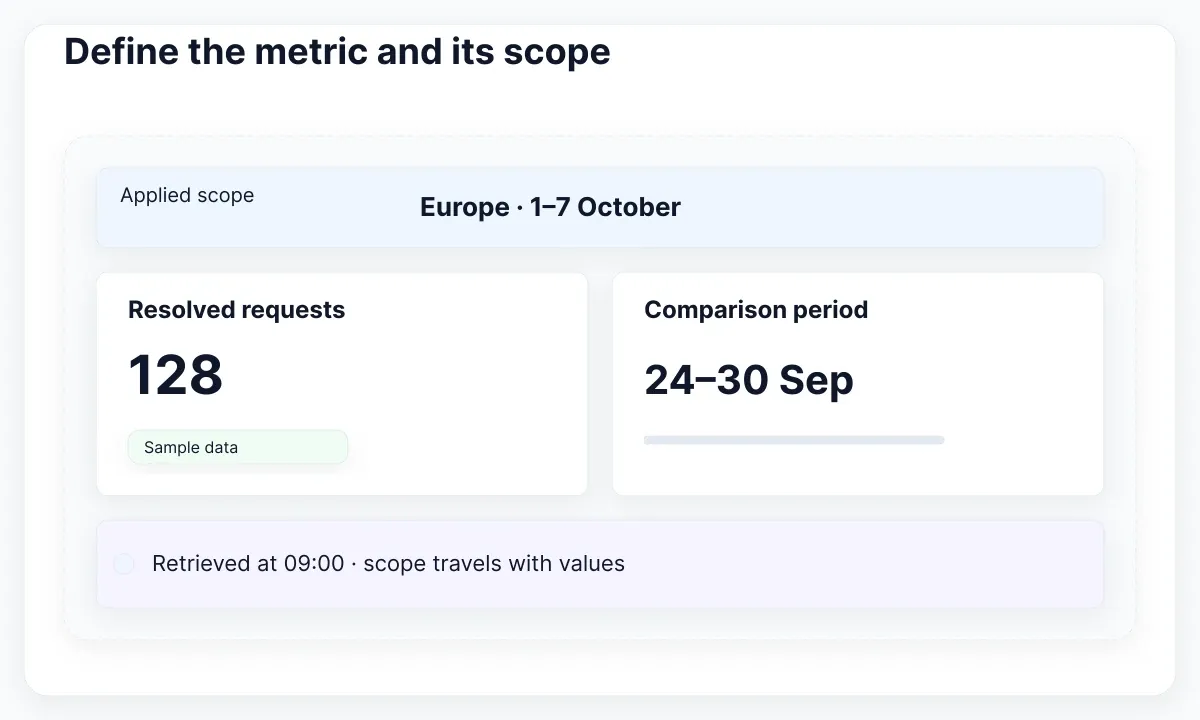
Create a small fixture with two teams and two periods. For Europe in the first period, use 128 resolved requests; for Europe in the next period, use 96. Give the other team different totals. Deliberately make one interval empty. These invented values let a reviewer notice when the heading changes but the card still contains the previous result. Keep the fixture simple enough to check by hand.
Treat each result as a package containing its scope, values and retrieval metadata. The scope includes the filters actually submitted, while the timestamp explains when that result was obtained. A percentage also needs an explicit comparison period and a policy for a zero denominator. Decide whether a dash means unavailable, not applicable or not yet calculated; avoid making the same symbol carry all three meanings.
Use the package as the acceptance unit. A reviewer should be able to read a screenshot and identify the team and period behind its totals. This is our recommended dashboard contract, rather than a rule imposed by a UI library. For broader component selection, the React UI kit acceptance guide covers a separate form-and-dialog task.
Separate edited filters from applied filters
With an Apply button, the controls can contain changes that have not yet reached the result. Keep an editable filter draft and an applied query deliberately separate. This distinction lets a person change both dates before requesting a new report. Without it, a heading may imply that unfinished control values already describe the chart underneath.
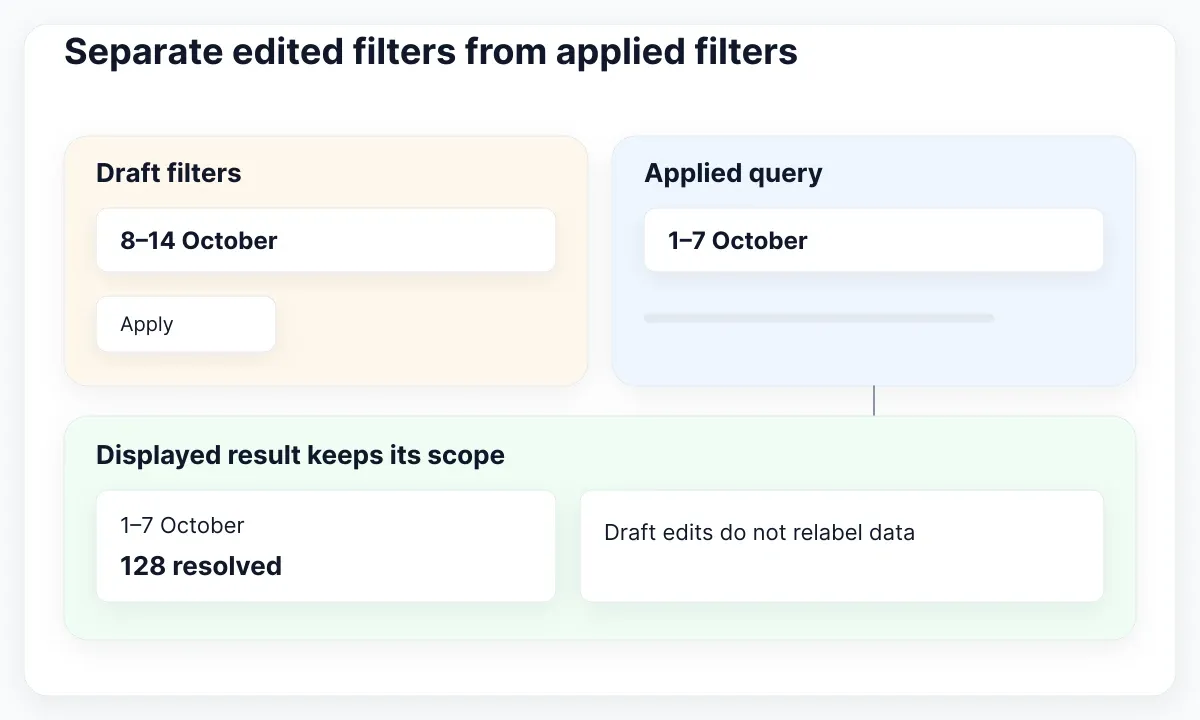
React recommends grouping related state and avoiding contradictory or duplicated state. For this screen, group the applied team and interval together. Store the result with its own query identity. A draft is justified because it represents unsent user input; a second copy of the currently derived label is usually unnecessary. Derive a label such as “Europe · 1–7 October” from the accepted query rather than maintaining another independently editable string.
Our proposed transition is edit, apply, request and accept. On Apply, validate the interval and create one query snapshot. A result may replace the displayed package only when it belongs to the current request. Keep the previous package visibly attached to its previous scope while refreshing, or replace it with a clearly labeled loading treatment. Never attach the new period label to old values without explaining the mismatch.
If the product updates immediately instead, document that policy and remove the redundant Apply promise. Test keyboard operation, resetting filters and switching teams with unsent edits. Decide whether Reset changes only the draft or also requests the default report. Write that behavior into the component contract so a code consumer does not need to guess from the button label.
Prevent an older response from replacing the report
A fast filter change can expose a failure that a static UI kit preview cannot show. Request A asks for the first period. Request B asks for the second period shortly afterward. B finishes first. If A then replaces the visible values, the dashboard displays an outdated answer under the latest controls.
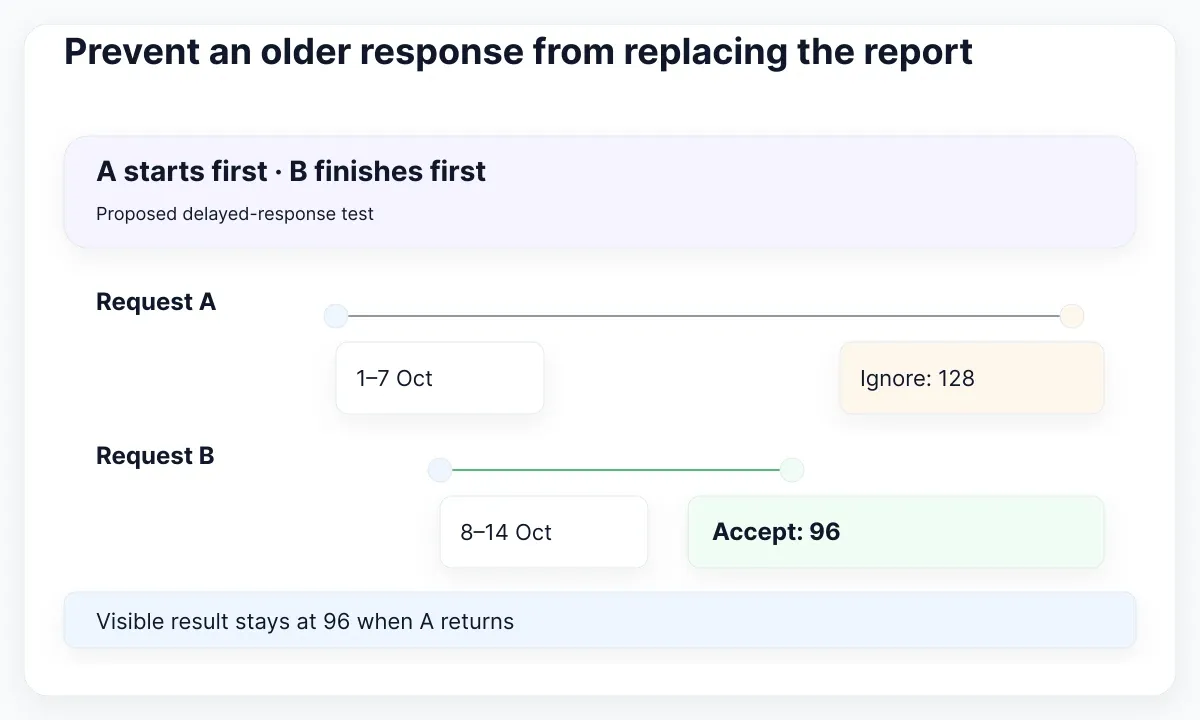
The React useEffect documentation demonstrates ignoring obsolete responses during cleanup and explains drawbacks of fetching directly in Effects. Use the data-loading mechanism appropriate to your application; when implementing manual fetching, define how an obsolete response loses permission to update the screen. Aborting a request can reduce wasted work, but the displayed-result acceptance rule still needs to be explicit.
For the fixture, delay A and let B finish immediately. The accepted card must remain at 96 when A eventually returns 128. Repeat with A failing after B succeeds. An obsolete error must not replace a valid current result with a failure panel. Record request identity in development diagnostics rather than adding confusing technical identifiers to the reader-facing interface.
Also test leaving the route while a request is pending and returning to it. Define what cached data can appear, which scope it belongs to and when it refreshes. The App Router integration guide addresses framework boundaries if that is your application environment. This article’s concern is the integrity of the result presented to the reader, independent of the chosen fetching library.
Give loading, zero and failure different meanings
Draw the report states before wiring real data. An initial request has no accepted result. A successful empty response has an accepted result with no matching records. A failed refresh may still have a previous result available. Treating all three as a blank chart prevents the reader from deciding whether to wait, change filters or try again.
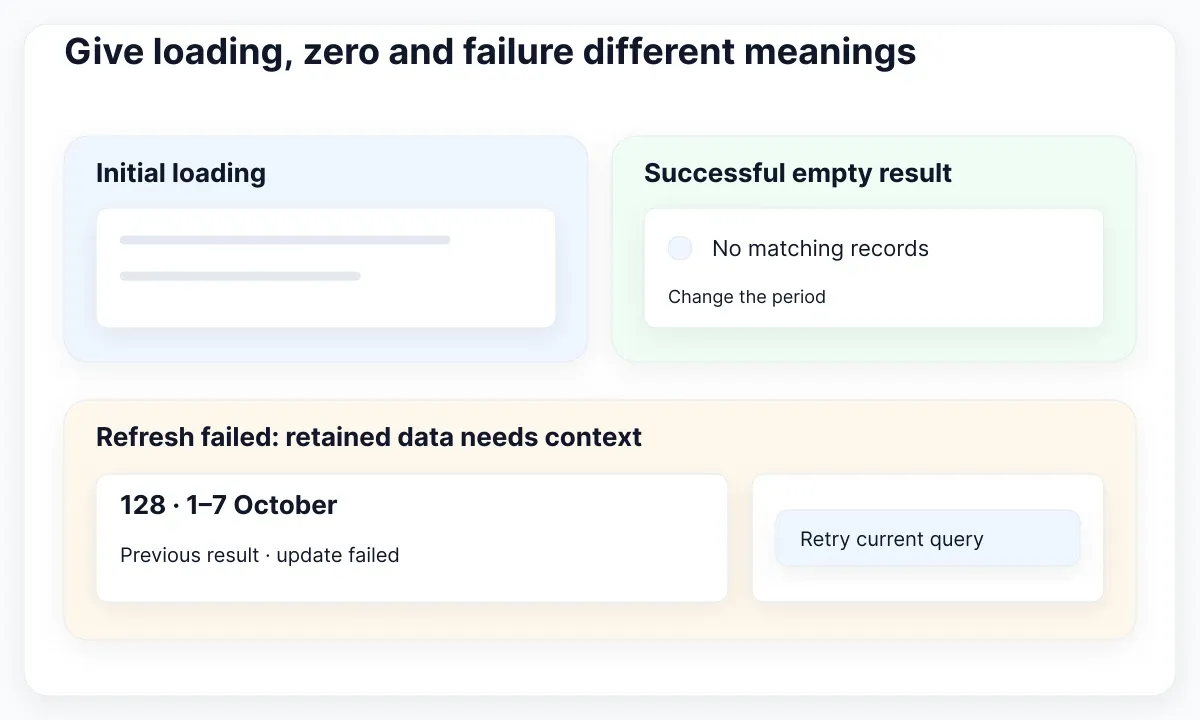
For the example, show “No resolved requests for this period” only after a successful empty response. Offer a way to change the interval without blaming the person. During the first load, reserve a stable region and describe the loading task. During a failed refresh, retain the previous result only with its original scope and a visible notice that the update failed. A retry should request the currently applied query.
W3C’s status-message guidance covers programmatically available feedback without taking focus. Use a concise status message for a completed update or failure when appropriate. Do not make every animated chart element a live announcement. Check the actual spoken result with assistive technology: “Report updated” is less useful than a short message that also identifies the relevant scope or outcome.
Write recovery copy with the next decision in mind. “Could not refresh Europe for 8–14 October; showing 1–7 October” is actionable context in our example. “Something went wrong” leaves the displayed values ambiguous. Avoid using zero as a temporary loading value: a zero is a data claim. Keep the error, empty and refresh treatments available as named specimens in the kit review.
Use EmviUI to compose the visual specimen
EmviUI’s dashboard image is useful for discussing hierarchy: a navigation area, summary cards and a larger chart share one screen. Inspect it as a design specimen, then annotate where the applied team, reporting interval and update notice would sit in your own product. The example image does not demonstrate a working React data connection.
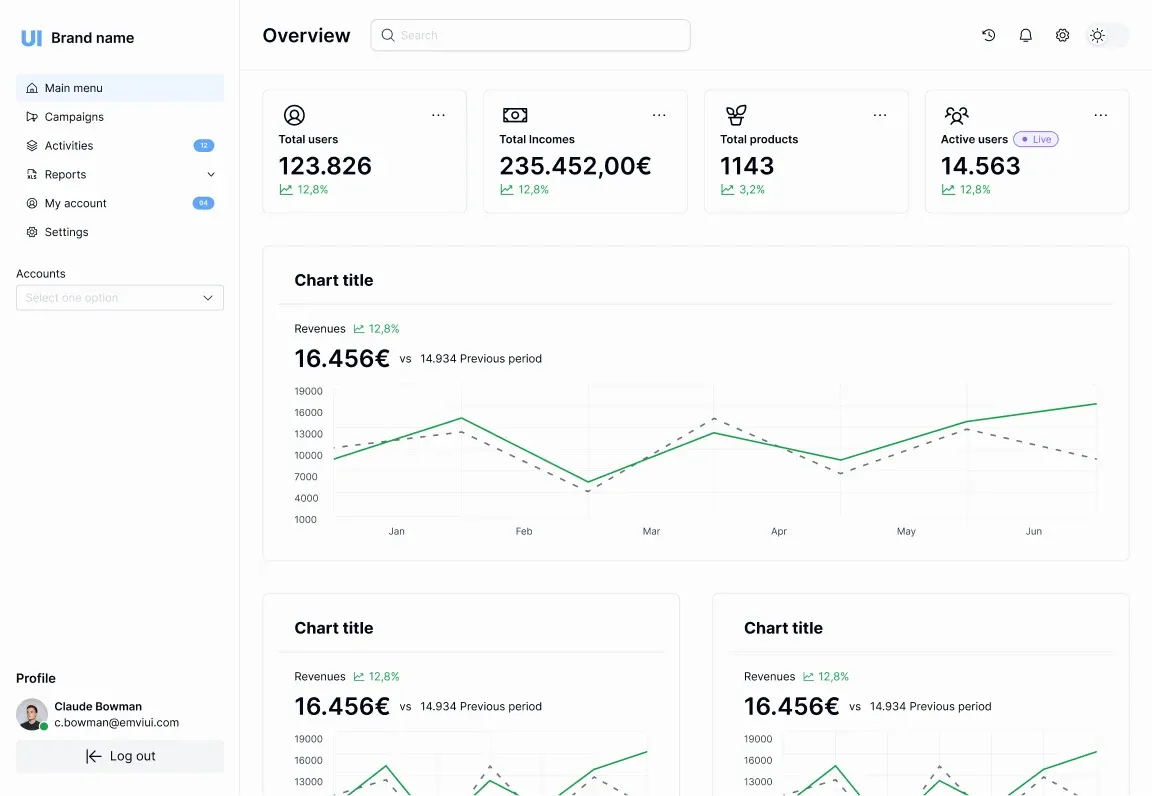
The current EmviUI component catalogue lists Figma components including inputs, table cells, charts and empty-state designs. Use those visual starting points to compose a filtered analytics screen and its companion states. A designer can compare the first-load and failed-refresh layouts side by side before developers connect the result model. This makes gaps in the proposed interface concrete.
For a React project, separately verify what the selected implementation package actually delivers. Check its source, accessibility behavior, styling integration and documentation. Do not infer runtime request handling from a Figma screenshot or assume that a visual chart supplies your reporting definitions. Assign an owner for the query model and another review responsibility for the presentation contract; a small team may have one person fulfilling both.
Prepare a handoff sheet containing the scope label, metric definition, example fixture and five report states. Add the rule for accepting a new result and the policy for retaining an old one. Link the visual components to their implemented counterparts once chosen. The UI kit and design system scope guide helps define how that initial specimen becomes maintained product work.
Keep the analytical question readable on mobile
On a narrow screen, preserve the question before preserving the desktop arrangement. Put the applied scope near the main metric, allow the filter summary to wrap and keep the update notice close enough to explain the result. In our example, the person must still distinguish Europe from the other team without opening a hidden navigation panel.
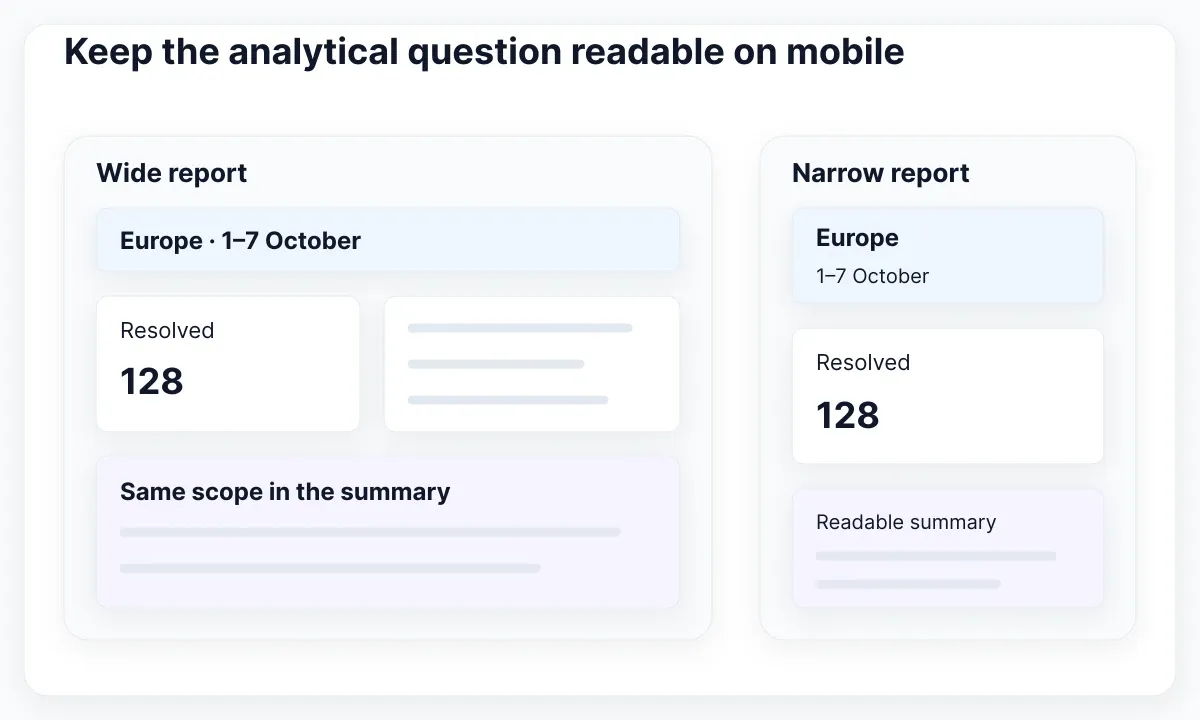
W3C reflow guidance describes presentation at a width equivalent to 320 CSS pixels, with exceptions for content that requires two-dimensional layout. Test the surrounding controls and explanations at that width even when a genuine data table needs its own horizontal scrolling region. A dashboard label should not disappear simply because its chart is wide.
Provide a readable alternative for the values needed to answer the task. If using a table, follow WAI’s table guidance for structural headers and their relationship to data cells. For our sample, a small team-and-period summary is often easier to inspect than a dense chart tooltip. This is a design recommendation, not a claim that every chart must be replaced by the same table.
Run the narrow fixture with long translated team names, enlarged text and a failed-refresh notice. Confirm that the notice does not push the scope label away from the value it qualifies. Keep keyboard focus visible as filters open and close. Review the reading order in the rendered page, because moving cards visually can leave the explanatory text in an unexpected place for keyboard or screen-reader users.
Review one complete reporting scenario
Review the analytical journey with a short script. Load Europe for the first period, edit the next interval without applying, submit it, then switch teams before the request finishes. Compare the visible scope and values after each step. Repeat with no records and a failed refresh. Include one successful retry so the review covers recovery as well as failure.
| Action | Expected visible evidence |
|---|---|
| Edit dates without applying | The controls show the draft interval, while the accepted report still says Europe, 1–7 October, 128 resolved. |
| Accept B before A finishes | The report changes to 8–14 October and 96 resolved. A later success or failure from A cannot replace it. |
| Fail the next refresh | The retained report keeps its original interval; the notice identifies the failed update and offers a retry of the applied query. |
Check calculations separately from network coordination. React’s guidance on unnecessary Effects recommends calculating derived rendering data directly when no external synchronization is needed. If the fixture is already loaded and a displayed subtotal is a straightforward calculation, do not add a second state machine solely to keep that subtotal synchronized. Define when a filtered total represents the whole report versus only the visible page.
Give the reviewer observable pass conditions: unsent edits do not relabel accepted data; obsolete responses do not win; empty success is distinct from failure; retained values keep their original scope; and the narrow view still answers the reporting question. Capture the fixture and results with the component review so future changes can repeat the same exercise. Expand to more metrics only after this small reporting contract is understandable.

Pablo Mayoral
Senior UX/UI & Web Designer with 10+ years of experience. Creator of EmviUI (10k+ components Figma design system), UImand, and Vitamin Bootstrap. Currently designing digital products at CQMRewards.