Automate Figma Code Generation: Tailwind Components & CI Validation
Generate a reviewable candidate, then check component reuse, tokens, user actions and stable visual references before accepting a design change.
Generate a reviewable candidate, then check component reuse, tokens, user actions and stable visual references before accepting a design change.
Direct answer: Automate Figma code generation as a reviewable change, then run independent validation in CI against approved component, token, interaction and visual contracts. Keep generation separate from acceptance: a successful export does not establish that generated Tailwind components still follow the design system.
Start with one billing form and its confirmation alert. Capture the approved design inputs, generate into a branch, and let tests identify specific drift before merging. The workflow below focuses on acceptance after generation. For the earlier implementation stage, use the Figma-to-Tailwind responsive workflow.
Pin the inputs before generation
A repeatable review needs an identifiable design input and a known code baseline. Figma Code Connect links design components to code examples; it can help a generation tool reuse your actual library. It is not, by itself, a CI approval gate.
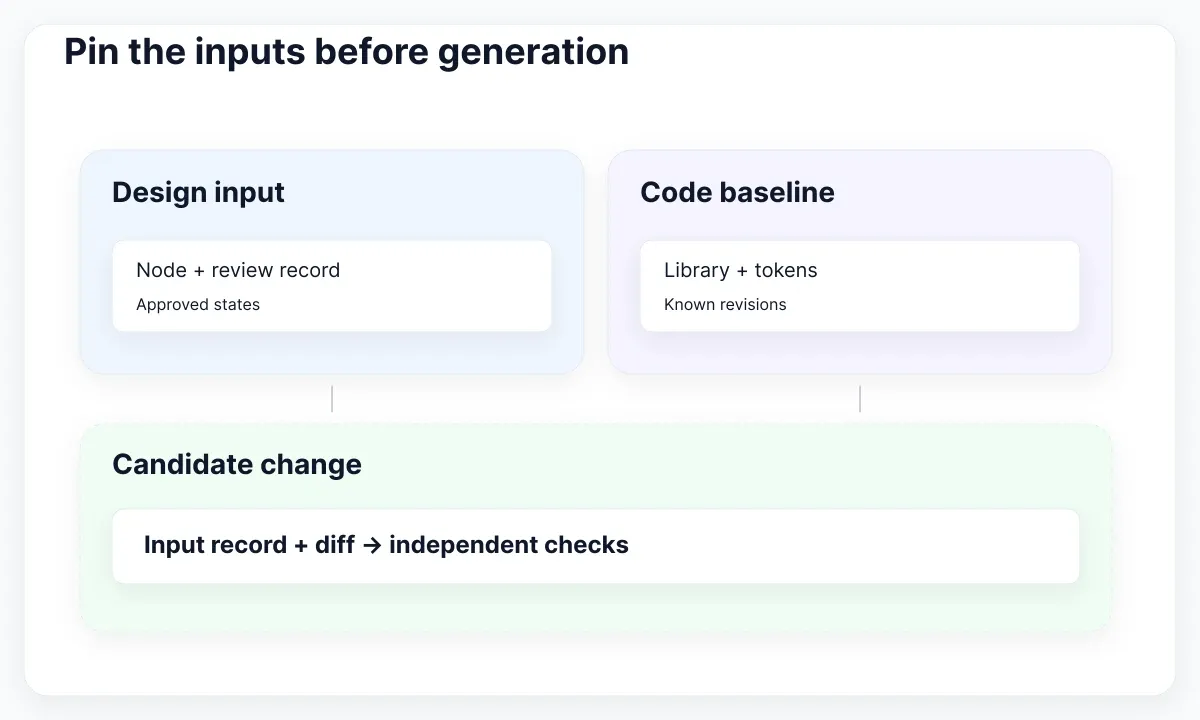
Create a small input manifest alongside the generated change. Record the design file and relevant node links, the approved review date, the component-library revision, the token revision, and the generation tool and configuration used. These fields are a suggested team contract, not a universal Figma manifest format. If your exporter supports an immutable input, retain it. Otherwise save the permitted design evidence and describe its limits rather than calling a live file link a frozen snapshot.
For our fictional billing form, the contract says that account name is required, an email address is editable, Save submits once, and confirmation appears after success. The design input also specifies narrow and wide layouts, the approved text roles, and the existing button and input components to reuse. Keep those acceptance decisions in a reviewed document that generation cannot silently rewrite. A later reviewer should be able to tell which behavior was requested without inspecting the generator's explanation.
Separate two pipeline stages. Generation produces a candidate diff and its input record. Validation installs the candidate from its lockfile, compiles it, and runs the agreed checks. Run validation on the code that will actually merge. Do not substitute the generator's temporary preview for the repository implementation: that preview may use different CSS, fonts, fixtures or dependencies.
For a first rollout, trigger generation deliberately when a designer approves a bounded change. Let CI run on the resulting pull request. Once that route is stable, automate the trigger supported by your exporter, while retaining the same review boundary. This recommendation avoids assuming every Figma integration exposes a headless generator or a dependable file-change trigger.
Give failures an owner. A missing input record belongs to the author of the candidate; an unavailable component mapping belongs to the library integration; a broken user action belongs to implementation review. A pipeline that reports only “design mismatch” sends everyone back to the beginning. Keep the generation log useful but concise, with paths and revisions rather than credentials or a dump of the entire design file.
Check tokens and component reuse
Inspect the source diff before interpreting screenshots. Tailwind theme variables determine which theme utilities exist. Your validation should distinguish approved theme usage from a generated literal that happens to look identical today.
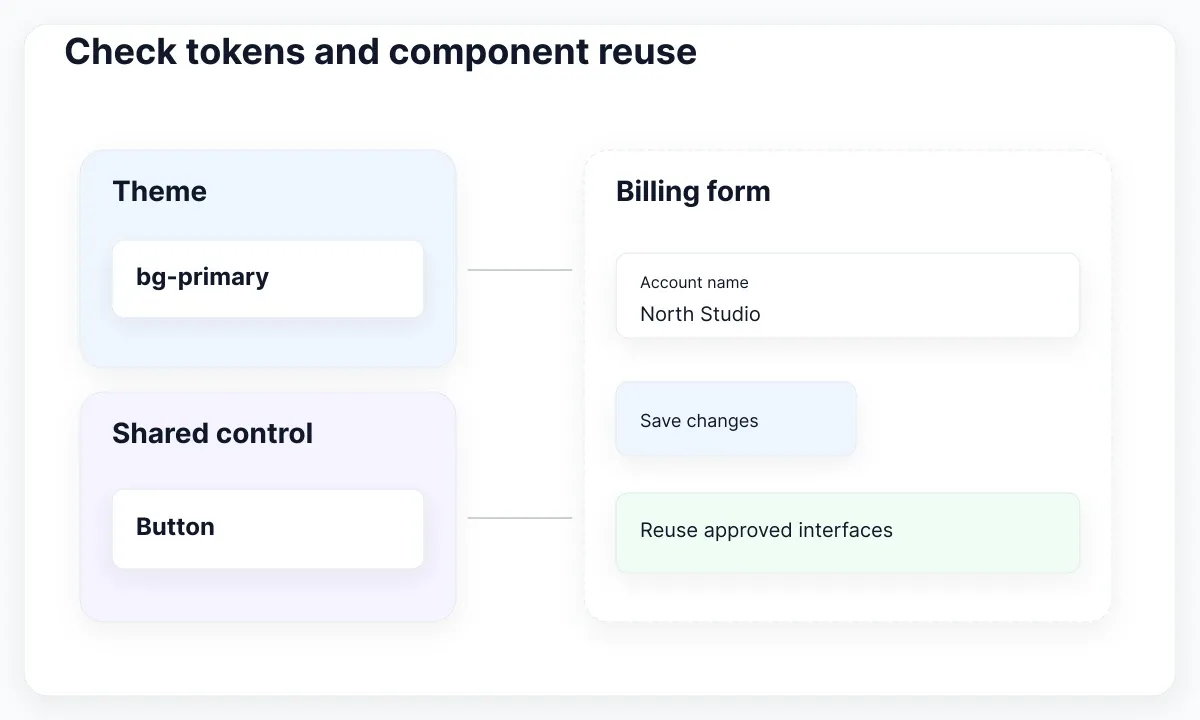
Suppose the design calls for the existing primary button. The candidate should import that component and pass its supported props, rather than create a second button with copied colors and spacing. Write a review checklist around a few named components: Button, TextField and Notice in this example. The names are illustrative; use the public interfaces already present in your repository. If an integration supplies component mappings, verify the output uses them rather than merely listing them in its report.
For tokens, start with a small prohibited-change policy. For example, generated files must not introduce a new brand color literal or edit the shared theme file without an explicit token change. An AST-based check or an existing lint rule can enforce a narrowly defined syntax rule. A text search can help review but is not proof: approved literals, comments, dynamically assembled classes and indirect styles complicate a blanket grep.
Keep exceptions explicit. A one-off chart annotation may legitimately require a value outside the shared scale; record the affected path, reason and reviewer. Do not ban every arbitrary value solely because it is arbitrary, and do not allow every value because the exporter emitted it. The useful rule is whether the choice belongs to the approved contract. For a deeper explanation of these shared decisions, see design tokens in web interfaces.
Compile and type-check the real candidate after these checks. A correct-looking class string can coexist with an invalid component prop or an import from an obsolete module. Preserve the failure output with the changed file and the expected interface. Keep build validation distinct from appearance validation: neither substitutes for the other.
Finally, inspect what the diff did not change. If the generator altered the billing form but left a shared token update untracked, the candidate may depend on an unstated local environment. Require every dependency needed to reproduce the reviewed result to be present in the change or referenced by an approved version. This is a practical reproducibility policy, not a promise that CI can infer design intent from source code.
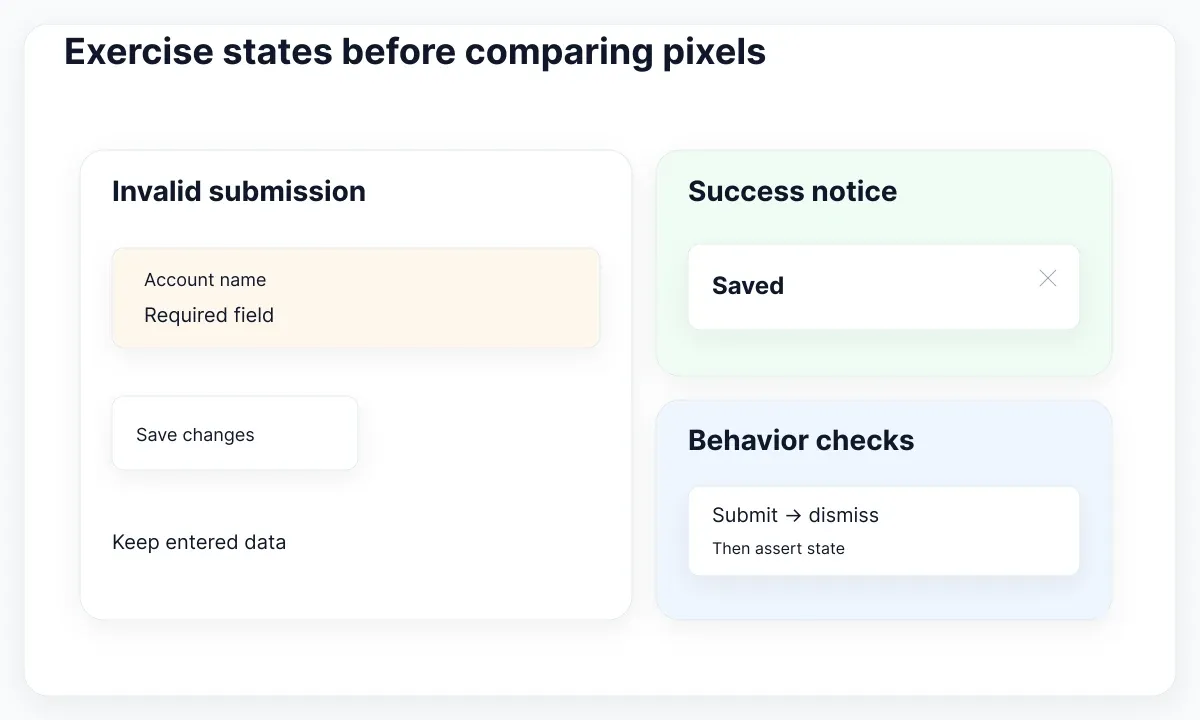
Exercise states before comparing pixels
The real EmviUI alert specimens below show color treatments, icons and close controls. They provide concrete visual test candidates. A screenshot can compare their appearance, but cannot establish that dismissal works or that an update is announced appropriately.
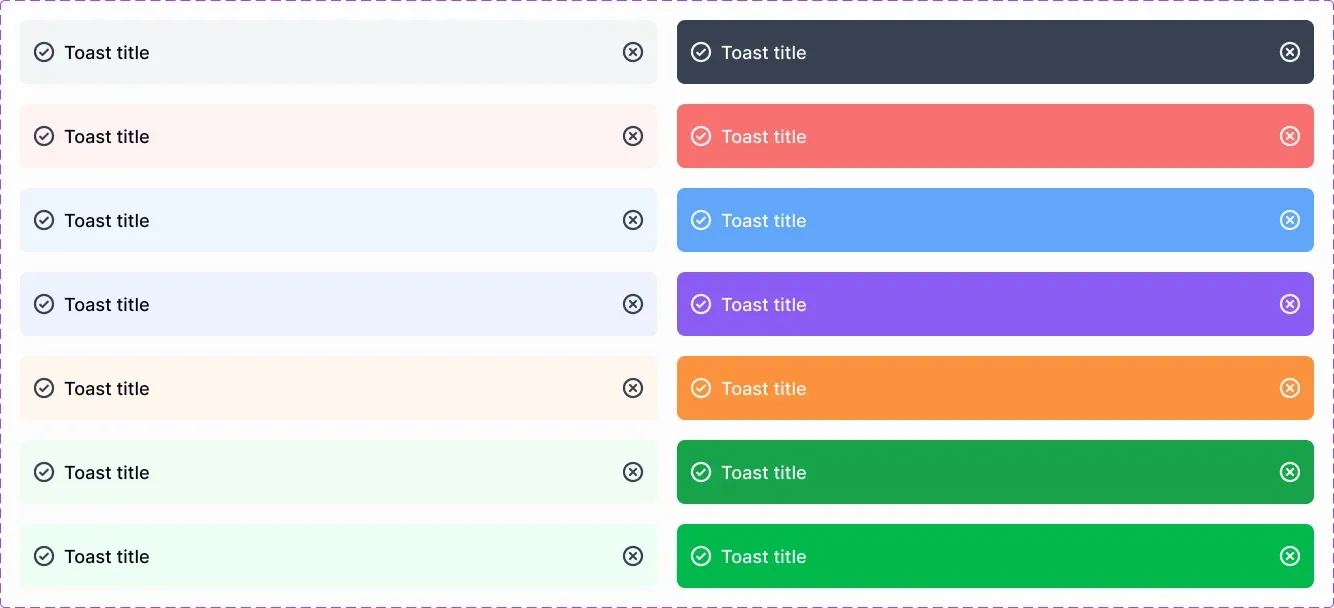
The live EmviUI catalogue includes reusable interface examples. Choose a specimen relevant to your billing flow, then implement and test the behavior in your own code. EmviUI can help define the design reference; this article does not claim it supplies a ready-made CI integration, a Tailwind generator, or accessibility certification. Its illustrated close control is a starting point for a behavioral requirement, not evidence of runtime behavior.
Build a bounded state list: initial form, invalid submission, pending request, success confirmation and failed request. For each state, write one observable acceptance condition. An invalid submission preserves entered data and displays the intended error; a pending request prevents duplicate submission; a successful request displays confirmation. These are suggested requirements for this example, so adapt them to the actual product rather than copying every state into every component.
Storybook documents running story tests in CI. If your project uses its Vitest integration, the documented route runs the configured Storybook project. Use the instructions for the integration and version installed in your repository; another project's command is not evidence that your tests are configured. Keep a story or fixture for each state that matters, with stable data and an explicit route for reproducing the failure.
Then assert behavior and accessible structure. Playwright ARIA snapshots compare a representation of the accessibility tree. They can catch an unintended change in roles or accessible names. Add focused assertions for critical actions: enter data, submit, wait for the expected response, dismiss the notice, and check the resulting state. A structural snapshot is useful evidence alongside these assertions, not a replacement for the actions themselves.
Run an accessibility scan after the relevant state is visible. Playwright accessibility-testing guidance explains integrating axe and explicitly notes the limits of automated checks. Keep keyboard and assistive-technology review in the acceptance process. A clean scan should be reported as “no violations detected by these configured rules in these tested states”, rather than “the component is accessible”. Preserve which states were scanned so a later change cannot quietly reduce coverage.
Make visual baselines reproducible
A visual comparison needs a stable rendering environment and an approved baseline. Playwright screenshot comparisons document both the assertion and environmental variation. Compare candidate code with a known reference using the same rendering setup.
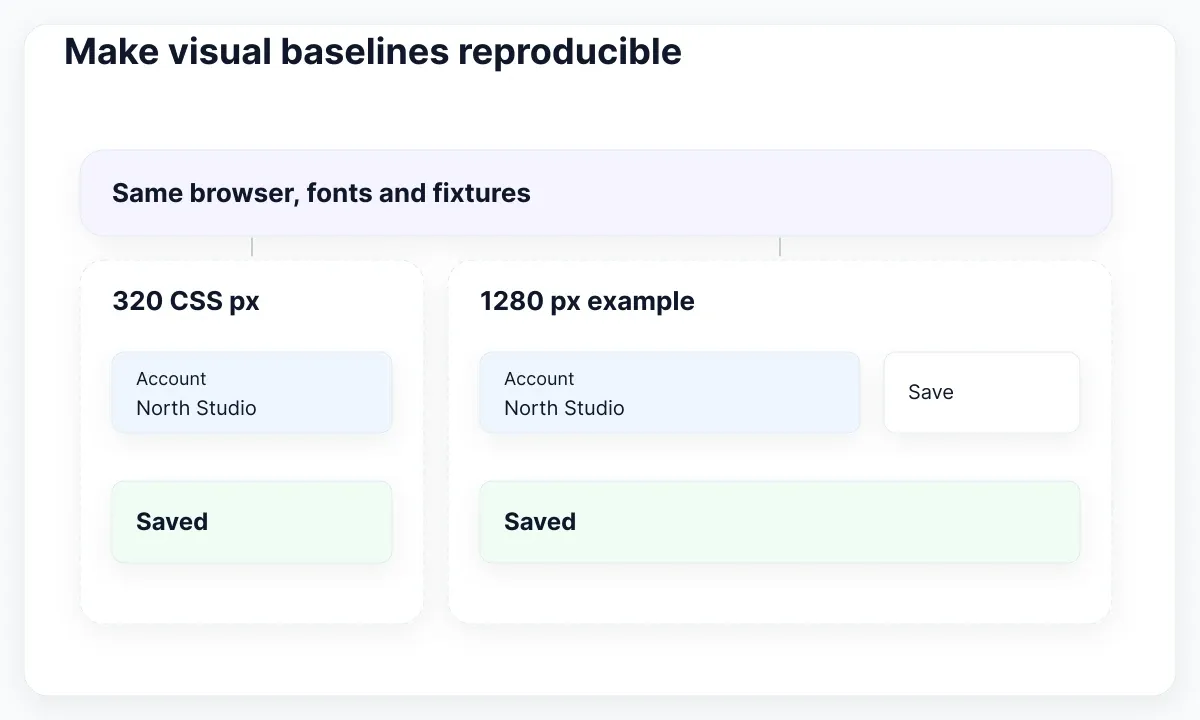
For the billing form, begin with a narrow 320 CSS-pixel viewport and a representative desktop viewport, such as 1280 pixels. The desktop width is an example test choice, not a standard. WCAG Reflow guidance explains the 320 CSS-pixel width requirement for vertically scrolling content and its exceptions. Test the applicable interface at that width; a wide screenshot alone does not establish reflow.
Keep the operating system image, browser version, fonts and dependency lockfile consistent with the baseline environment. Provide deterministic fixture data for account names, error messages and confirmation text. Wait for the state and fonts your test needs, rather than adding an arbitrary delay and hoping everything has settled. If the UI contains a timestamp, use a controlled value. If a live avatar is irrelevant to the review, replace it with a stable fixture.
Choose screenshot boundaries that answer a question. A component crop shows whether padding, text wrapping and controls changed. A page view shows whether the form disrupts its surrounding layout. Use both only when each adds evidence. A single enormous page snapshot is difficult to review and can obscure a small but important clipping defect.
Separate genuine design variation from test noise. A changed font file is an environment problem until the team has approved a typography change. A long Spanish label wrapping within its supported container may be correct. A clipped error message is a defect even if the pixel difference is small. Record the reason for any tolerance or mask; do not increase thresholds simply to get a green build.
Keep locale coverage realistic. Test English and Spanish samples when both ship, using actual interface copy. Include the longest credible field label or error in the affected flow. The nested Auto Layout guide helps designers define the resizing contract before implementation. CI can then verify the implemented specimen against that contract, while a reviewer checks whether the chosen baseline still expresses the intended design.
Review drift before updating baselines
Classify a failure before accepting new output. Use three outcomes: implementation defect, intentional design change, or test-environment difference. These are review decisions; no screenshot tool can make them reliably without the surrounding product context.
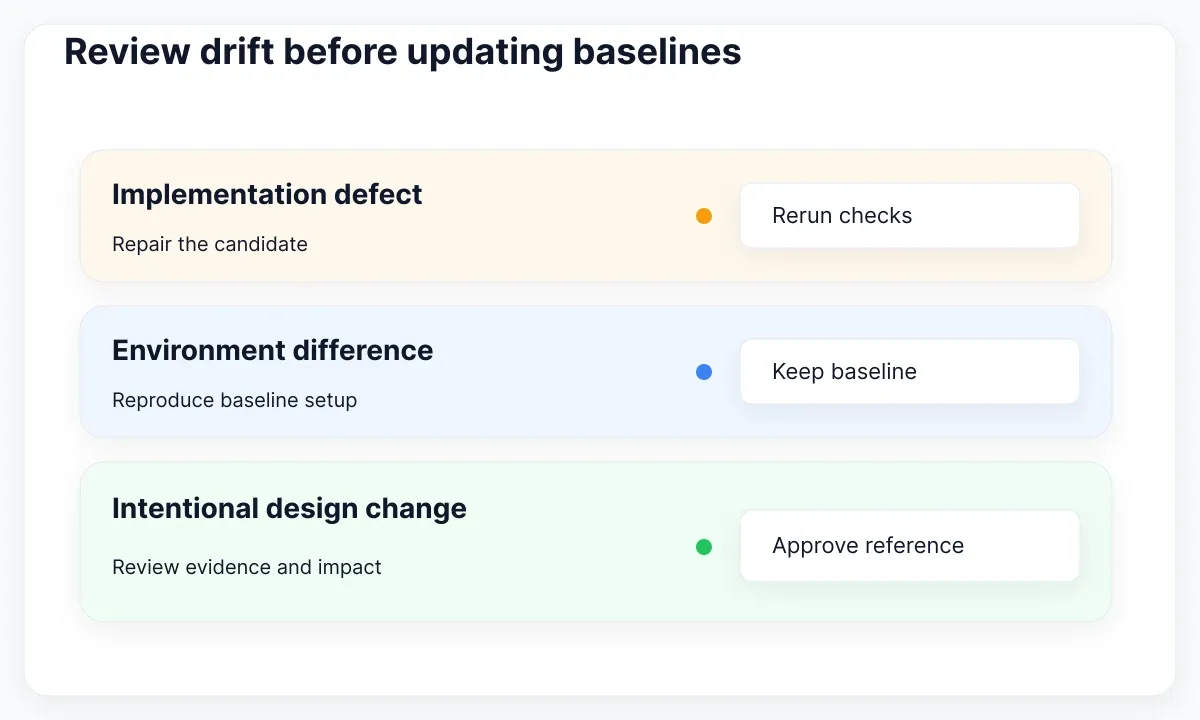
For an implementation defect, repair the candidate and rerun the failing checks. Imagine the exporter replaced Notice with a generic container and removed the close button's accessible name. A screenshot might look almost identical, while a role-based interaction fails. Restore the shared control and its contract. Keep that failure as a regression test because it protects a user action, rather than asserting incidental source formatting.
For an intentional change, review the design evidence, token impact, changed states and new screenshots together. Approve the new baseline only after agreeing that the changed interface is desired. Keep the baseline update in the same reviewed change or a clearly linked follow-up. Do not let a CI job automatically overwrite reference images whenever the candidate differs; that would turn the check into a record of whatever was last generated.
For an environment difference, reproduce with the expected image and dependencies before touching the design. Preserve the actual image, expected image, difference image, test name, viewport, locale and relevant versions as review artifacts. A compact report that says “Spanish success notice, narrow viewport, text clipped” gives a reviewer a useful next action. A report containing hundreds of unlabeled images does not.
| Failure | First decision | Acceptance evidence |
|---|---|---|
| New color literal | Approved token change or bypass? | Reviewed token mapping |
| Dismissal fails | Behavior defect | Passing action assertion |
| Text wraps differently | Copy, font or layout change? | Reviewed locale specimen |
| All captures shift | Environment mismatch? | Reproduction with baseline setup |
Keep the first adoption small. Protect one frequently edited form with a handful of meaningful states, then expand when a real gap appears. Track whether a failure identifies a clear owner and a reproducible defect. If a check repeatedly fails on irrelevant differences, improve its fixture or scope instead of teaching reviewers to ignore it. This is a maintenance recommendation, not a performance claim about any testing tool.
The useful deliverable is a candidate whose inputs, code and acceptance evidence can be reviewed together. Generation remains replaceable: a different exporter should face the same component, token and behavior checks. That separation lets a product team improve generation speed without quietly weakening the standard used to accept the resulting interface.

Pablo Mayoral
Senior UX/UI & Web Designer with 10+ years of experience. Creator of EmviUI (10k+ components Figma design system), UImand, and Vitamin Bootstrap. Currently designing digital products at CQMRewards.