Set Up a Token Pipeline: Figma Variables, Git & Style Dictionary
Connect Figma, Git and Style Dictionary through an explicit approval boundary, reproducible token builds and separately verified component and library releases.
Connect Figma, Git and Style Dictionary through an explicit approval boundary, reproducible token builds and separately verified component and library releases.
Set up a token pipeline by choosing one approved source for token values, treating Figma edits as proposals when Git is authoritative, and generating component-library assets from a reviewed commit. Keep a mapping between token paths and Figma variables, validate aliases and modes before release, and publish the Figma library separately. Synchronization should reproduce an approved decision; it should not let every connected tool overwrite every other tool.
This workflow answers how to set up a token pipeline that synchronizes Figma Variables with Git, Style Dictionary, and a component library without creating conflicting sources of truth. Our example changes a notification surface in a fictional SaaS product. The ownership rules and release checklist below are design recommendations, while linked documentation establishes each tool's actual capabilities.
Choose one approval boundary
Start with a written editing contract. In the model used here, Git stores approved token data, Figma provides a design workspace and a projection of released values, and Style Dictionary produces platform assets. The component library consumes those assets. A designer can propose a new value without silently making that experiment the value every product must ship.
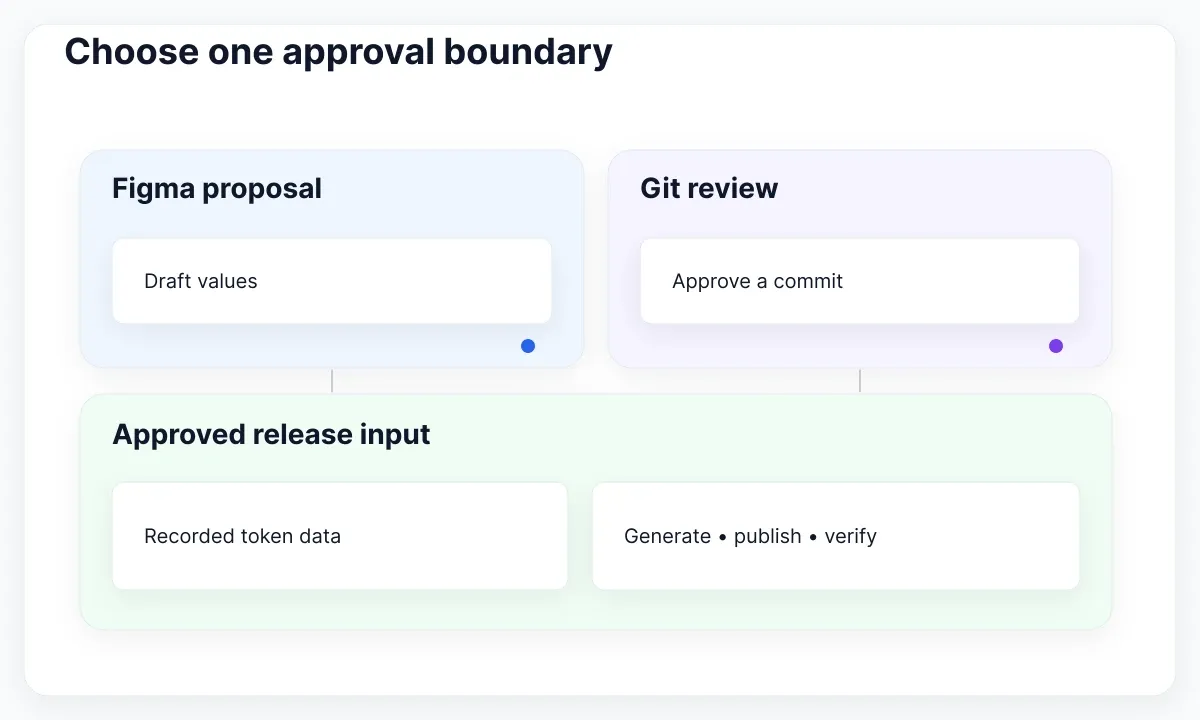
Figma can also be the authoring authority if that better fits your team. In that model, take a reviewed export as the release input and preserve it in Git. The important decision is which event approves a change, not which application feels more familiar. Avoid a loop where importing generated CSS into Figma creates another export that automatically replaces the repository.
Write down who proposes, who reviews, and who releases. For our notification change, a designer proposes the new surface treatment, a system maintainer checks its intended role, and a frontend maintainer reviews affected consumers. These roles may belong to two people in a small team. What matters is a visible decision record and an identifiable release owner.
Give generated output a clear label and regeneration instruction. If a teammate needs to patch a generated variable, direct the change back to the approved input. Otherwise the next build can erase a useful repair. Keep application-specific layout rules in the application; shared token authority should not become authority over every local product decision.
Create a small interchange contract
Define the smallest useful token set before connecting tools. Include token path, type, value or reference, description, and intended context. The DTCG format report defines JSON token data and aliases; it is a Community Group report rather than a W3C Standard. Use a named format version so an adapter upgrade has an explicit compatibility target.
For example, let color.notice.surface reference color.palette.blueSoft. The first name expresses a component role; the second supplies its palette value. Preserve that relationship in your approved data even if a platform output resolves it to a concrete color. Reviewing a semantic relationship is more informative than comparing two identical color literals.
Add a mapping manifest for the Figma collection, variable, mode, and repository path. Treat names and tool identifiers as separate fields. A human-readable name can change while an identifier remains stable, and copying a file can introduce a different identity. Record the actual mapping and inspect it after a migration instead of assuming a matching name proves continuity.
Choose one notification role and two contexts for the first release. Do not start by synchronizing every radius, shadow, typography composite and product exception. Our guide to tokens in web design explains the underlying concepts; this workflow concentrates on the boundary that turns those decisions into reproducible releases.
Import Figma changes as reviewed proposals
Select a transfer mechanism that your environment supports. Figma's mode import and export guidance documents JSON transfer. Its Variables REST API documentation describes programmatic variable operations with Enterprise access, file permissions and scoped credentials. Check those requirements before designing an unattended service around the API.
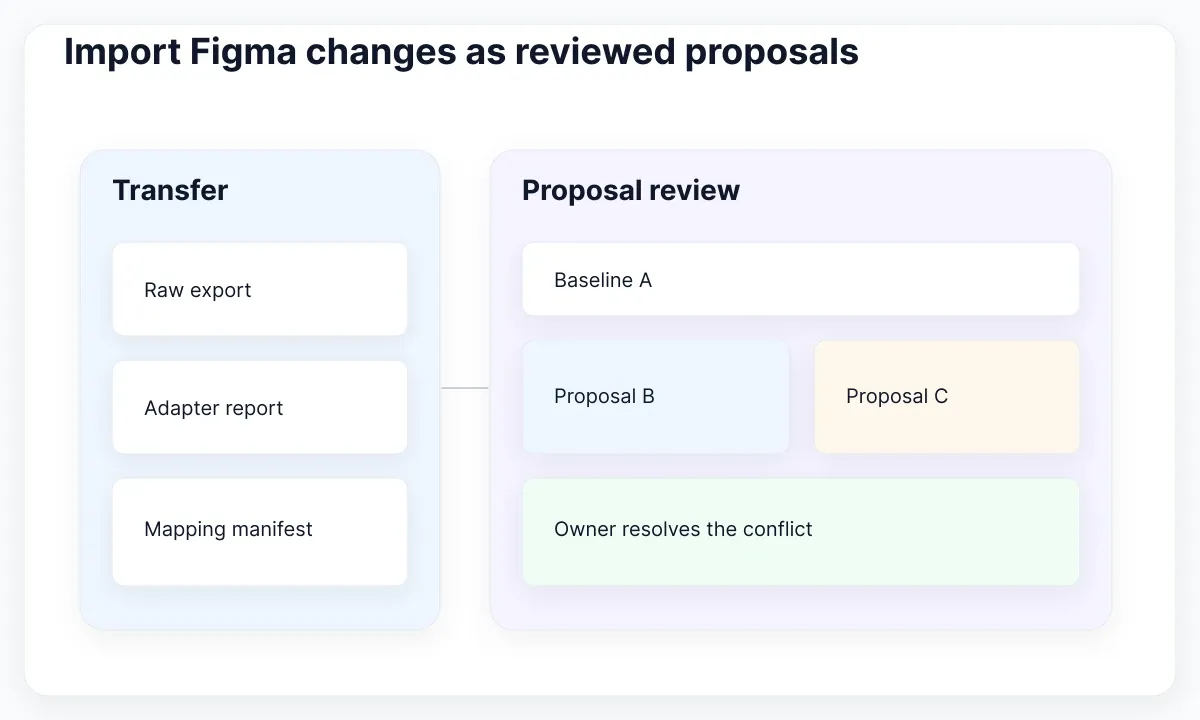
For a first iteration, a deliberate export can be easier to audit than a continuously running integration. Save the raw export separately from the normalized proposal. The raw file explains what the tool supplied; the normalized file shows the data your pipeline intends to accept. Never overwrite approved inputs merely because a transfer succeeded.
Run an adapter check on the proposal: expected paths, declared types, alias targets, supported values and name collisions. Report omitted or unsupported data explicitly. A transfer that imports some values is not evidence that every token round-tripped. Record the adapter version and the input file so another maintainer can reproduce the same interpretation.
Use a conflict case during setup. Suppose the designer proposes one notification surface while a repository change proposes another. Show both proposals and their common approved baseline. Ask the owner to select or revise the intended decision; do not resolve a design disagreement through whichever upload happened last. The accepted proposal must carry the reason for the new value.
Build platform outputs from a fixed input
Style Dictionary is the transformation step, not an approval authority. Its configuration documentation describes input paths and platform output settings. Use a narrow source glob, an explicit output directory, and configuration stored beside the token data. Keep scratch exports outside that glob so a temporary file cannot join a production build accidentally.
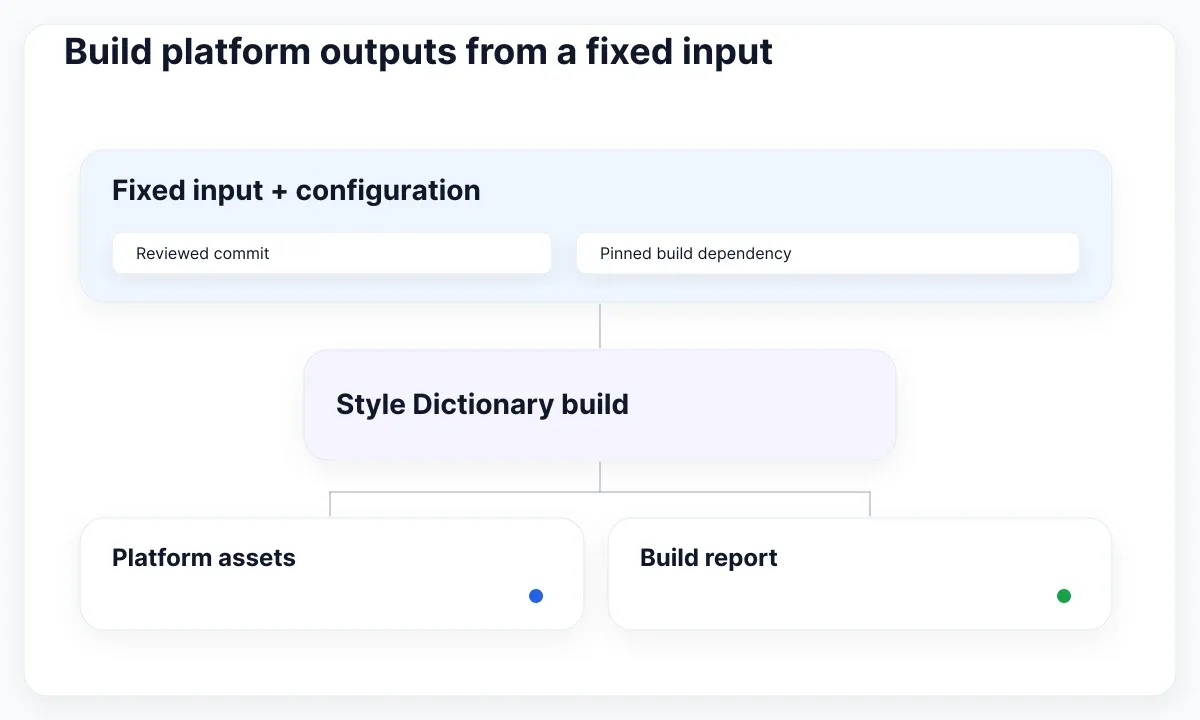
A minimal build script imports StyleDictionary, constructs it with the configuration file, and awaits buildAllPlatforms(), as shown in the official module guide. Pin the dependency and record the runtime used by your project. Reproduce a release from its commit rather than rerunning today's defaults against yesterday's input.
Inspect alias behavior deliberately. The reference utilities documentation explains reference resolution and handling filtered token sets. Decide whether a particular output should preserve references or resolve values, then test that choice. A filtered CSS file should not point to a custom property that was excluded from the same delivered asset set.
For our first release, build the notification tokens, inspect the generated name, and load the result in a specimen page. Compare it with the approved role rather than a random exported screenshot. If your target is Tailwind, our variable-to-Tailwind mapping guide covers that downstream mapping; the release input remains the reviewed token set.
Review the change through a real component
The EmviUI alert specimen below makes the consumer review concrete: it shows light surfaces and stronger treatments with an icon, label and dismissal control. Use it to identify which visual roles need deliberate mappings. The picture does not establish the token bindings in your file, prove accessibility, or show an integration with Style Dictionary.
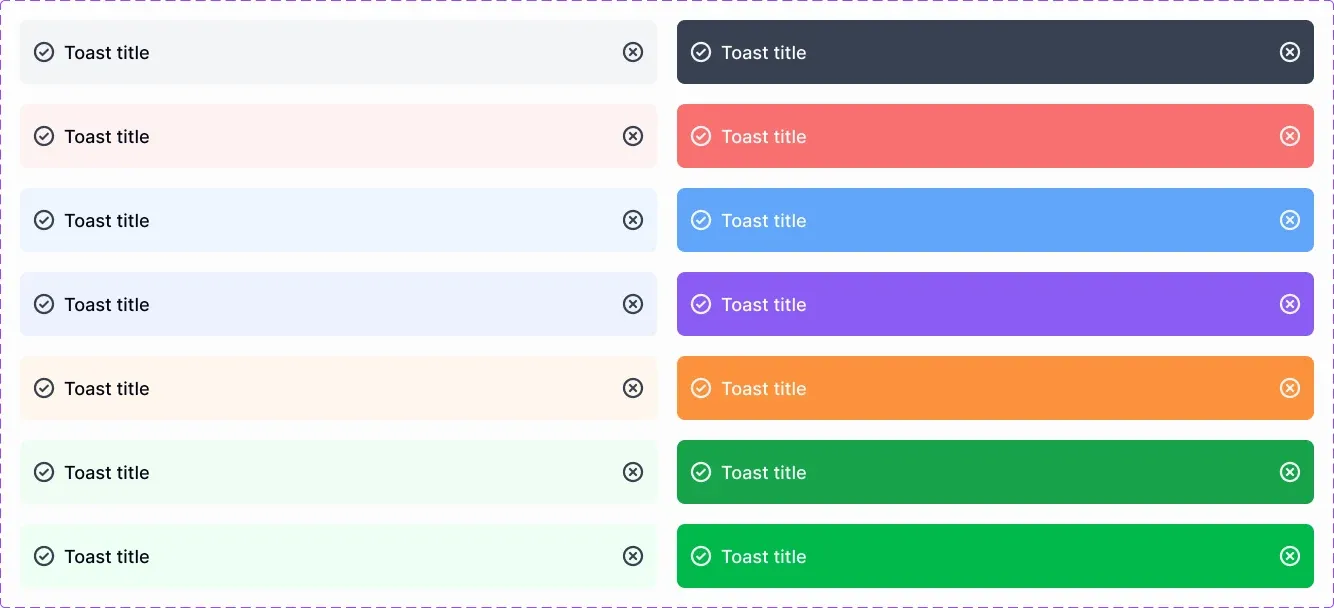
The EmviUI component catalogue includes foundations and alert/toast components. A team can start with one such component and connect its relevant properties to its own approved roles. Inspect the actual file first. This article does not assume an existing EmviUI-to-Git adapter or promise automatic synchronization.
Make a small acceptance specimen: a notice with a long message, an icon and an available dismissal action. Review its surface, text, border and focus treatment in each supported context. Label what is shared and what is local. A product-specific message length should not be solved by changing the shared color token.
Compare the design specimen with the implemented consumer after the build. Record token release, component version and tested context together. If the surfaces match but dismissal stops working, that is a component behavior issue rather than evidence that the color pipeline is wrong. Our variant and override diagnosis helps investigate the design-side component separately.
Release code and Figma with explicit receipts
A merged repository change is not the whole release. The Figma library publication guide explains that edits in the source file remain local until published, and consumers review library updates. Maintain separate receipts for the token build, the component package and the Figma publication rather than calling them all “synced.”
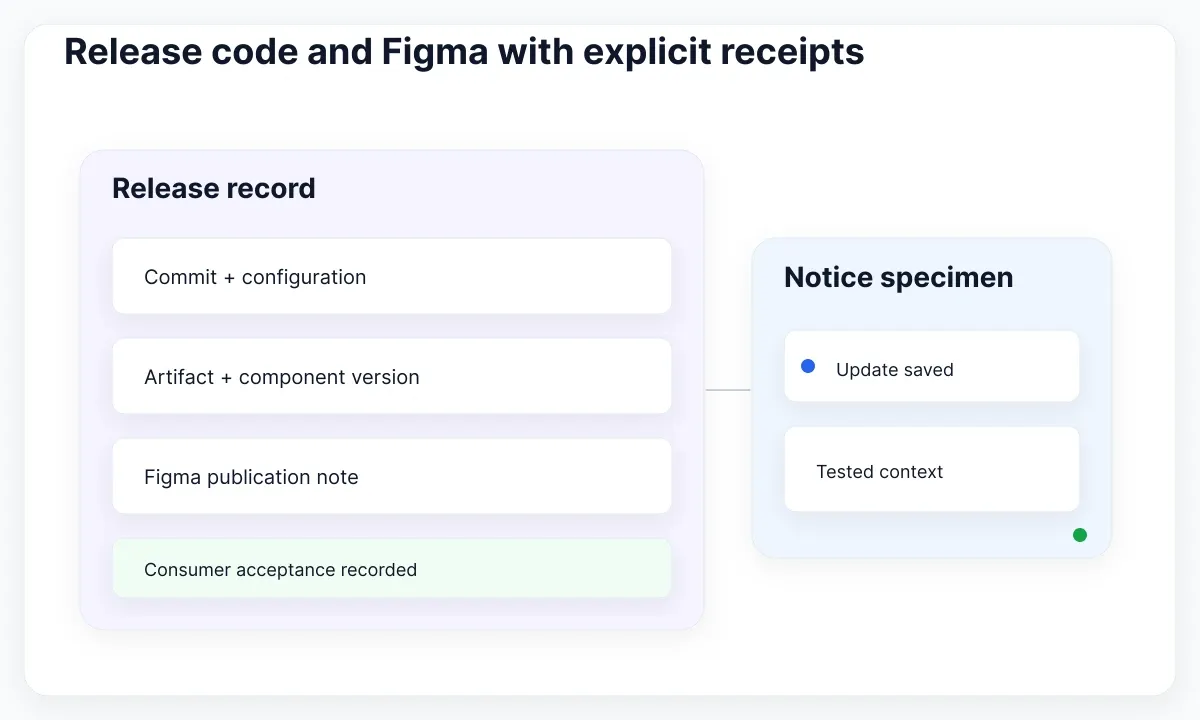
Use a compact release record: approved commit, build configuration, output artifact identifier, component version, Figma source file and publication note. Add the tested consumer file and contexts. If one stage is pending, say which one. This makes it possible to distinguish an intentional rollout delay from a broken adapter.
Publish a bounded change first. For example, release the notification surface update without simultaneously renaming every semantic role. Ask a consumer to accept the library update and inspect the same specimen used in review. A successful source-file import alone cannot establish that a downstream design file now uses the intended values.
When several Figma libraries depend on each other, inspect the dependency path before claiming completion. Use the recorded files and versions to locate the stale stage. Keep product teams informed about required acceptance actions. Release coordination is part of this workflow even when the transfer and transformation steps are automated.
Block ambiguity before merging
Turn the editing contract into visible checks. On GitHub, protected branch settings can require reviews and status checks before a merge, subject to the repository's available features. Those controls enforce a process; your team still defines what the checks must validate and who can approve a semantic change.
Recommended checks include unresolved aliases, duplicate normalized names, missing expected contexts, unexpected deletions and changes to the mapping manifest. Keep a readable diff alongside machine output. A reviewer should see that a notification role changed and why, rather than only a long reordered JSON file.
Test failures intentionally before trusting automation. Remove an alias target in a disposable proposal and confirm that the release stops. Rename a mapped variable and confirm that the report requests a mapping decision. Try a second unapproved export and confirm it cannot replace the accepted baseline. These tests verify the editing boundary directly.
Handle emergency changes through the same record with a smaller scope. Identify the broken consumer, responsible owner and temporary exception. Reconcile the exception into approved inputs before resuming ordinary releases. Quietly patching both a generated stylesheet and a Figma specimen produces two undocumented repairs that can diverge again.
- Validate paths, types, aliases and expected contexts.
- Review the semantic diff and mapping changes.
- Build from the approved commit and recorded configuration.
- Record component delivery and Figma publication separately.
- Verify the consumer specimen and retain recovery inputs.
Rehearse token release recovery
Keep the previous approved input and its release record available. If the notification update causes a regression, decide whether to restore that input or release a corrected proposal. Rebuild the outputs and coordinate the corresponding Figma publication. Reverting one repository file does not by itself update every already released consumer.
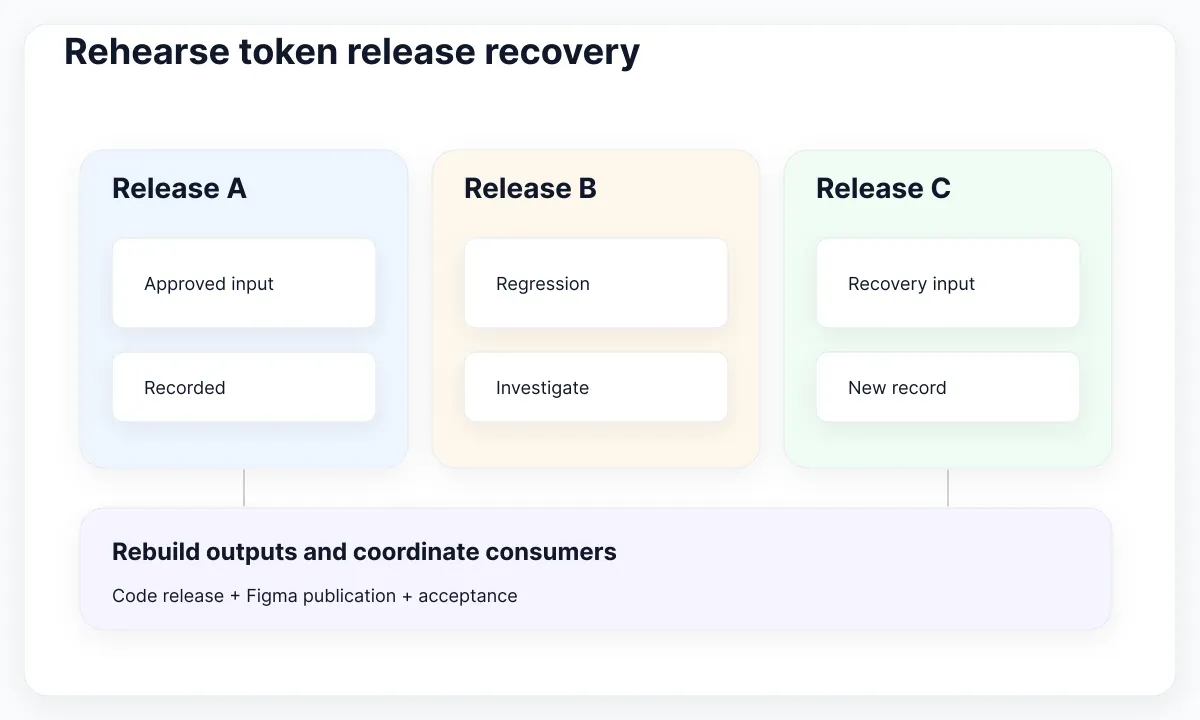
Practice this with a harmless specimen. Start from release A, approve release B, and recover to an explicitly recorded release C using A's intended values. Check the implementation and a consumer design file. Verify the mapping, published assets and acceptance actions, not just whether the source data looks familiar again.
Expand only after someone other than the original author can reproduce the build and explain a conflict. Add another component role, another mode or another platform one at a time. Each addition should include a supported-data check and a consumer acceptance case. This keeps the pipeline understandable as the system grows.
The useful outcome is a traceable path from a proposed design decision to an approved release. Tools move and transform values; people define meaning, authority and acceptance. With that contract in place, synchronization becomes a repeatable delivery step instead of a contest between editable copies.

Pablo Mayoral
Senior UX/UI & Web Designer with 10+ years of experience. Creator of EmviUI (10k+ components Figma design system), UImand, and Vitamin Bootstrap. Currently designing digital products at CQMRewards.